
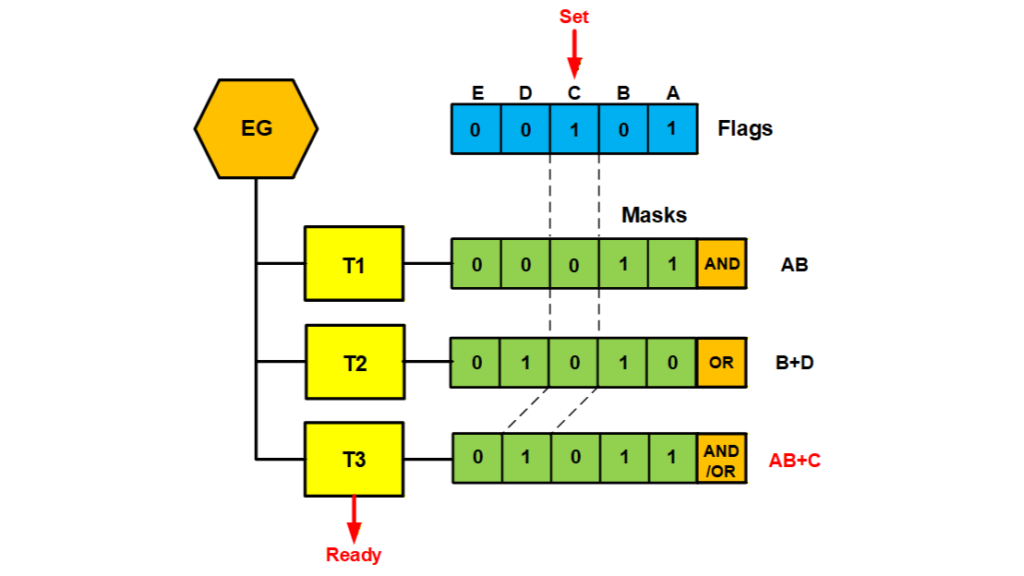
Event groups can play a central role in determining when tasks run in a system. They are useful for system control and state machines. Most RTOSs support event groups, but capabilities vary. Some permit up to 32 flags others have 24 or less flags. Also the combinations of flags that can be tested vary.
How They Work
Event groups allow tasks to wait on combinations of events, which are represented by flags. In the figure, task T3 is testing for AB+C. As shown, the C flag has been set to one, which causes the AB+C mask to pass so T3 becomes ready to run. T1 is testing for AB and T2 is testing for B+D. Setting C causes neither of these to pass, so T1 and T2 continue waiting.
An event group is headed by an event group control block (EGCB) and tasks are enqueued in FIFO order. The order of tasks in the task queue does not matter because event group operations test all tasks in the queue for every event. Tasks passing a test are put into the ready queue in priority order, so task priority is not lost due to the FIFO queue.
In simple cases, an event group will have only one task waiting. However, if tasks are waiting for shared events, it may be more efficient to use a single event group rather than an event group per task. Then a shared event flag need be set only once. Also if there are a large number of events in a system and various tasks wait for individual events at different times, a single event group may be the simplest solution.
Setting Event Flags
Event flags are set by:
bool EventFlagsSet(eg, set_mask, pre_clear_mask);where eg is the event group, set_mask specifies what flags to set, and pre_clear_mask specifies what flags to preclear. Usually one flag is set at a time, but more than one flag can be, if desired. The pre_clear_mask has special uses that are discussed later. When one or more flags are set, the result is compared to the test mask of every waiting task. Each match causes the corresponding task to become ready to run.
Event flags can also be pulsed with:
bool smx_EventFlagsPulse(eg, pulse_mask)In this case, the flags specified by pulse_mask are turned on until all testing is complete, then they are turned off. Hence, only waiting tasks are effected, not tasks that wait after the pulse.
Testing Event Flags
A task can test event flags with:
u32 smx_EventFlagsTest(eg, test_mask, mode, post_clear_mask, timeout);Where eg is the event group, test_mask specifies what flags to test, mode specifies OR, AND, or AND/OR, post_clear_mask specifies what flags to clear after all task masks have been tested, and timeout specifies how long to wait. It is usually desirable to clear an event flag, once it has been acknowledged, which is the purpose of the post_clear_mask. Hence, the post_clear_mask and the test_mask are often the same.
If a test fails, the task is suspended in the task queue and the masks are saved in the task control block (TCB) of the task. As noted above, each time flags are set, the result is compared to the test mask of each waiting task, and, if there is a match, the task becomes ready and the flags specified in the post_clear_mask are cleared. The value returned indicates which flags caused the match.
It also is possible to see what flags are set, without waiting, with:
u32 EventGroupPeek(eg, PK_FLAGS);The return value shows the flags that are set. This could be useful for monitoring what is happening, without actually waiting on the event group.
Uses
In the OR mode, an event group permits waiting upon many events at once. Assuming the test_mask and post_clear_ mask are the same, when one of the events in the test mask occurs, the task becomes ready and the flag is cleared. The return value indicates which flag caused the match, so the task can use a switch statement to select the operation to perform. After preforming the operation, the task will go back to waiting on the same flags.
Some events may need to have staying power, so they remain in effect even after causing a task to become ready. As an example: both taskA and taskB must run if event X occurs, but both may not be waiting in the event group when event X occurs. This can be handled by setting flags A and B when event X occurs. Then taskA waits on flag A and taskB waits on flag B. The tasks clear their respective flags, when resumed.
Pulsing flags can be used to wake up tasks waiting on them, without waking up tasks that have yet to wait on them.
In the AND mode, an event group permits waiting for all of the AND’ed flags to be set. This is useful if more than one event must occur before a task can run. In such a case, one of the flags might be a mode and the other an event. Then, the post_clear_mask might be set to clear only the event and not the mode.
The AND/OR mode allows qualifying events depending upon the system mode. For example, (M0A + M1B) could mean test for A in mode 0 or for B in mode 1, so A or B would be cleared by a test, but not M0 or M1. The mode flags would be changed only when the system mode changed. When that happens, the pre_clear_flag in EventFlagsSet() would clear one mode and the set_flag would set the other mode. This makes the modes mutually exclusive.
Shared Flags: If multiple tasks are waiting on different flags in the same event group, things are simple. However, if tasks wait upon shared flags, operation is more complex. When a shared flag is set, all tasks waiting only upon it will become ready. Then the flag is cleared if it was in at least one post_clear_mask. However, it is best if each task has the flag in its post_clear_mask, in order to avoid problems.
Tasks can also wait upon different combinations of flags that include shared flags (e.g. task1 waits on A+C and task2 waits on A+B). However this can become overly complicated, in which case, using separate event groups may be a better solution.
Conclusion
From the above, it is apparent that event groups can be used in many ways to solve system control problems and that indeed they are a mighty tool. Performing logical operations outside of tasks can simplify the tasks and can make system operation easier to understand. Code for event groups, can be found in xeg.c at www.github.com/Micro-Digital/SecureSMX.